The Evaluations feature is the second key component of Virtual Humans, complementing the Character editor. Evaluations provide a way for content creators to customize how the learner is assessed during a role-play scenario. By setting evaluation criteria and example phrases, content creators can define what success looks like in each interaction. After the learner completes the conversation, the system generates a detailed "Performance Report," providing feedback and scores based on the defined criteria.
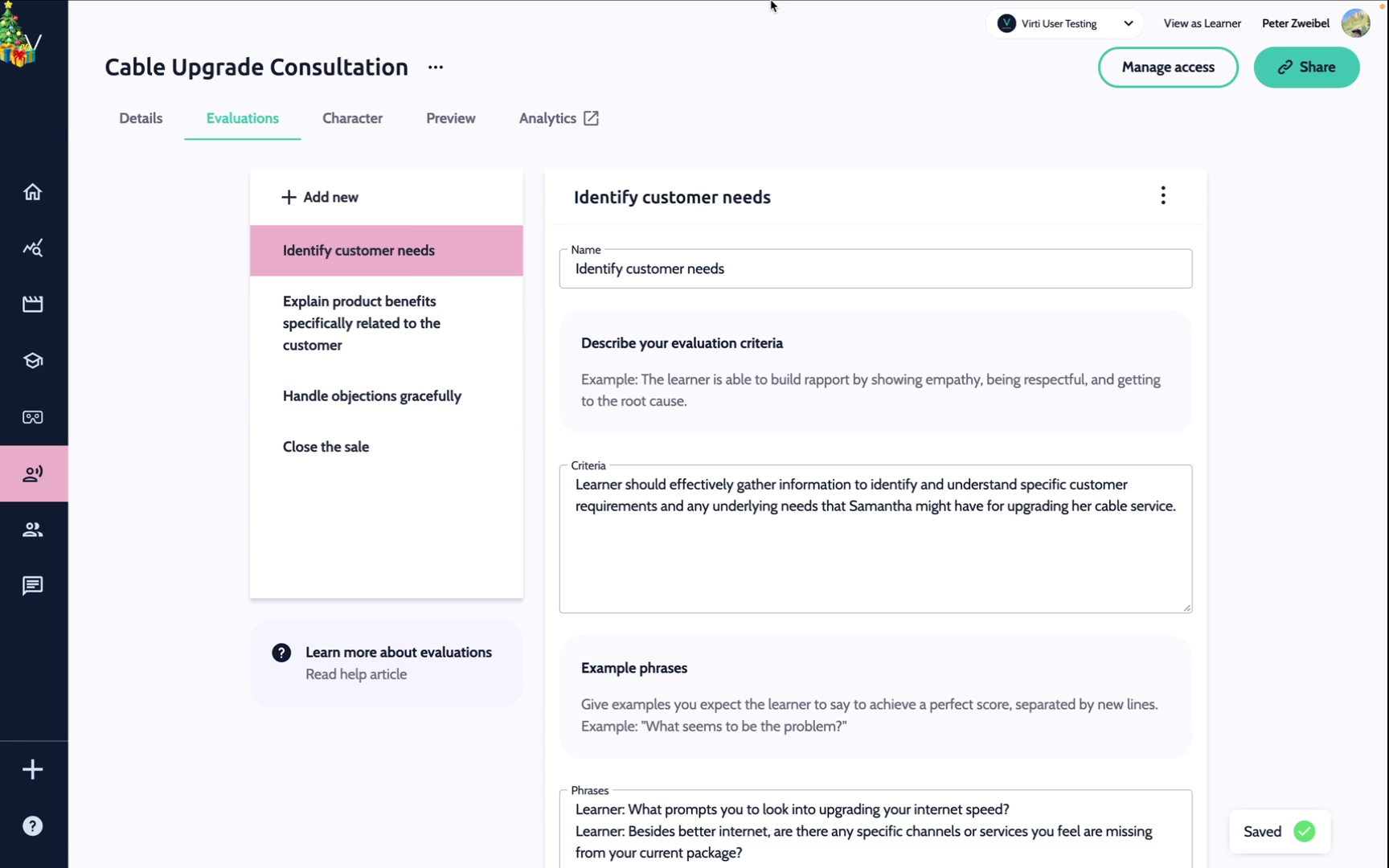
Adding Evaluations: Content creators begin by defining distinct evaluation categories for the role-play scenario. These categories should reflect the key behaviors or skills being assessed.
Defining Evaluation Criteria: For each evaluation, describe how it should be scored, specifying the behaviors, actions, or outcomes that indicate success. For example, for "Empathize"
Criteria: Show active acknowledgment of the other person’s emotions and validate their experience.
Use empathetic language (e.g., "I understand why that would upset you.").
Maintain a calm, understanding tone.
Avoid dismissive or judgmental phrases.
By specifying behaviors like these, you provide clear benchmarks for success.
Example Phrases: Provide examples of ideal responses to guide learners and illustrate what a good score looks like.
"I can see how this situation has been frustrating for you. Let’s figure out how we can resolve this together."
Performance Report Generation: After the learner completes their conversation with the Virtual Human, the system analyzes the transcript and uses the evaluations to generate a report.
Overall Score: An average score across all evaluation sections.
Section-Specific Feedback: Detailed scores and feedback for each evaluation section.
General Feedback: A summary of the learner’s performance and areas for improvement.
Below are some examples of typical communication models, and the behaviors that can be evaluated.
Template: LAST Model
Evaluation Criteria:
Listen: Allow the customer to explain their issue fully.
Acknowledge: Show empathy and understanding of their problem.
Solve: Provide a solution or a workaround to the problem.
Thank: Express gratitude for their patience and feedback.
Model: LEAPS
Evaluations:
Listen: Actively listen to the other person’s concerns.
Empathize: Acknowledge their feelings and validate their experience.
Ask: Clarify details by asking open-ended questions.
Paraphrase: Restate their issue to show understanding.
Summarize: Agree on actionable next steps to resolve the conflict.
Model: CLEAR
Evaluations:
Calm: Approach the situation with a calm demeanor to de-escalate tension.
Listen: Gather facts by listening actively and neutrally.
Explain: Offer clarity about next steps or available options.
Action: Take decisive, appropriate actions to mitigate the situation.
Review: Follow up afterward to evaluate the solution’s success.
Sales Discovery:
Model: MEDDIC
Evaluations:
Metrics: Quantify the business impact of the solution.
Economic Buyer: Identify who makes the purchase decision.
Decision Criteria: Understand what criteria drive the decision.
Decision Process: Learn how the decision will be made.
Identify Pain: Pinpoint the problem your solution solves.
Champion: Find and work with an internal advocate.
Align with Training Goals: Ensure that evaluation criteria and example phrases are directly tied to the skills or behaviors you want learners to develop.
Be Specific and Actionable: Provide clear, measurable criteria to guide learners effectively.
Iterate Based on Feedback: Test your evaluation setup with learners and refine it based on their performance and feedback.
Use Realistic Scenarios: Ground your criteria and examples in realistic, role-specific interactions to enhance relevance and applicability.
Need more help? Contact us at [email protected]
