
Accessing your past Virtual Human performance report
This guide explains how learners can access their performance summary, and generate AI powered performance analysis after they have completed their session.
Reviewing your performance and getting feedback is key to an effective learning experience. Learners can access their Virtual Human performance reports any time by logging in to their account on a web browser learners at any time.
Currently, the AI performance analysis is only available in the web browser, so users who complete a session in VR or on mobile must follow the steps below to access the full report.
Accessing your performance report
To access your Virtual Human performance report, log in to app.virti.com, and navigate to My Profile and then Virtual Humans
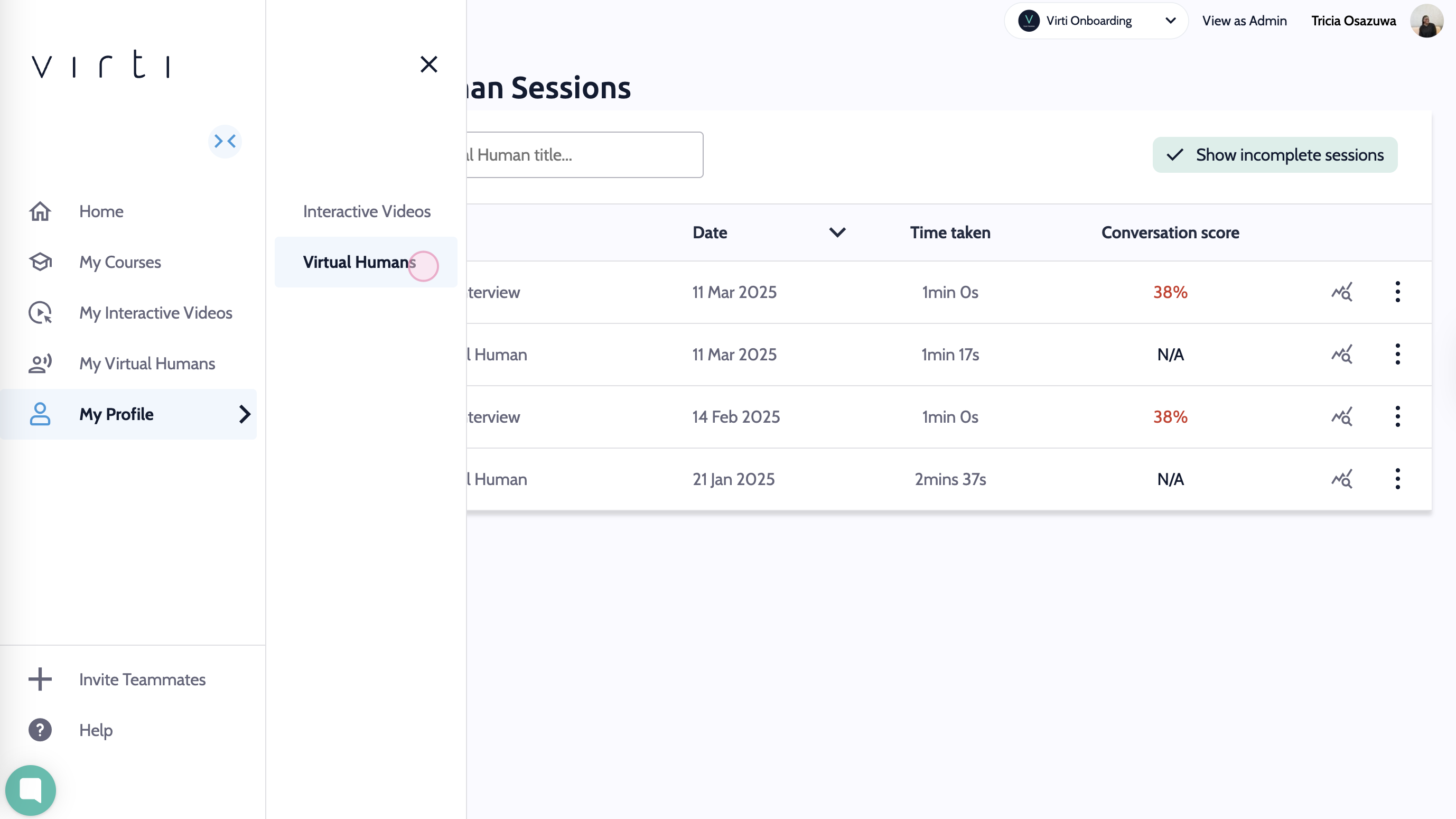
Here you will see a list of all of your completed Virtual Human Sessions. Click the Report icon next to the session that you would like to review.
This will display the performance report for your chosen session.
If you have not done so yet, you can gain even more insight into your performance by hitting Generate with AI to get an AI powered analysis of your performance.
This will analyze the entire conversation, generate a summary of your interaction, give you a rating based on the objectives, and provide feedback on how you did and what you could have done better.
You now you know where to access all of your past performance reports for Virtual Humans.
Need more help? Contact [email protected]